
Help
Using FPL Mundo
Search your FPL manager name in the box on the home page, paste your league’s standings link, enter its number (e.g. 123456), or browse to fplmundo.com/123456. FPL Mundo supports Classic Leagues and Head-to-Head leagues of 3–50 managers free, or 51–100 with Big League membership. Unfortunately it does not support Draft leagues.
Can I find my league by my name?
Yes. Type your first and last name as they appear on FPL, pick yourself from the managers with that name, then pick the league. If lots of managers share your name, you’ll be asked for part of your team name too. Names come from FPL’s public league tables; don’t want to be found?
What’s my FPL mini-league number?
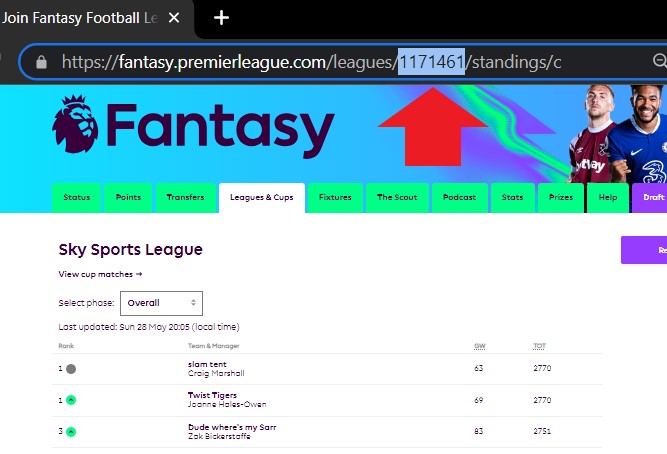
Your mini-league number can be found by viewing your mini-league standings on the official FPL website and checking the address bar — it is 1171461 in the picture example below. You can paste that whole address into the finder. The number itself is digits only, and is different to the FPL league invite code which is both numbers and letters.
What’s my FPL team ID?
Your team ID is the number in the address bar when you view your own team’s Points page on the official FPL website — fantasy.premierleague.com/entry/1234567/event/38. Searching by team ID shows every classic league your team is in, so you can pick the right one without hunting for league numbers.
Saved leagues
Leagues you visit are remembered automatically on your device. Find them under "Your leagues" — tap the league name at the top of any edition, or look for the welcome-back chips under the league finder. Remove one with the × on its chip.
Why does it say “writing your edition”?
The first time a league is requested (or right after a gameweek finishes) we write the edition fresh — it usually takes about 30 seconds and the page updates by itself, so there’s no need to refresh. If it’s still going after a few minutes, refresh once or get in touch.
Bugs, feedback and suggestions
I build FPL Mundo on my own, so it’s never quite finished. If you find a bug or have a suggestion, tap Bugs or ideas? on the edition (it includes the address of whatever you were looking at), or email hello@fplmundo.com.